








Product blueprint · build plan & India cost inside

Any outfit you love, tailored to your size

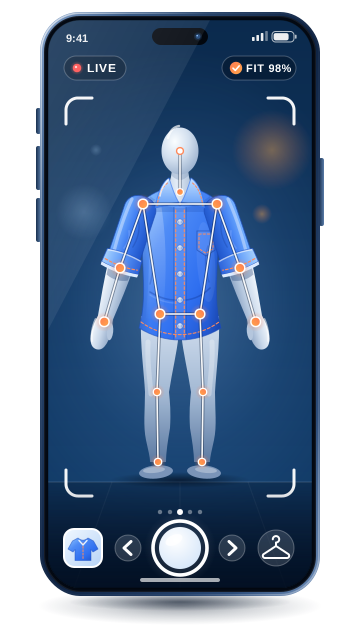
Upload one photo of an outfit you like. FitCraft AI designs it for your shirt, pant and T‑shirt size, exports a tailor‑ready PDF your tailor can stitch from, and lets you try it on live through your camera.

Three sizes, one photo, one tailor‑ready PDF. Works on phone, tablet and laptop.

  • Web app, no download
  • Try‑on runs on your device
  • 1:1 print‑scale PDF

Built for Indian sizes · English and हिंदी · designed with tailors, not just algorithms

Planned on proven, open technology

  • Next.js
  • PostgreSQL
  • MediaPipe
  • three.js
  • FreeSewing
  • PWA
The flow

From a screenshot to a stitched outfit

Eight steps in the app, one promise behind them: a tailor pack accurate enough to cut cloth from.

  1. Step 1

    Register

    Sign up with your phone number or email and confirm with a one‑time code.

  2. Step 2

    Enter your sizes

    Shirt (like 32), pant (like 40) and T‑shirt (S to XXL). Add height or fit preference for a closer match.

  3. Step 3

    Your profile

    Your sizes live on a profile in your name. Edit them any time and re‑fit every saved design.

  4. Step 4

    Upload a favourite outfit

    A model wearing it, or any screenshot of someone in an outfit you like.

Smiling cat in a paper-bag costume with its arms open — the FitCraft mascot
  1. Step 5

    AI designs it to your size

    The bot reads the garment, then rebuilds it from your measurements, not the model’s.

  2. Step 6

    Save your designs

    Keep every version, compare them, and re‑fit when your sizes change.

  3. Step 7

    Export the tailor pack

    One PDF at your size: measurements, pattern pieces at 1:1, cutting layout and stitch notes.

  4. Step 8

    Try it on, live

    Open your camera and see the saved outfit on you before a single cut is made.

Accuracy design targets

1:1

print scale on every sheet

Checked with a 10 cm test square

±1mm

seam match between joined pieces

Automated check; a failed check blocks export

3

garments at launch

Shirt, pant and T‑shirt

<60sec

photo to saved design

v1 target, measured in the pilot

These are design targets for version 1, not measured results. They are validated with partner tailors before launch.

Step 9 · the promise

A tailor pack your tailor can trust

A photo cannot give exact measurements, so we do not pretend it does. The AI reads the style; your sizes and a pattern engine supply the numbers.

  • Measurements, not guesses. Your sizes map to body and garment measurements from Indian size tables. Add height, chest or waist for a tighter fit.
  • Patterns from code, not pixels. Every edge is drawn by a parametric engine, so every edge has a real length.
  • Automated geometry checks. Joined seams must match, pieces must close and mirror. A failed check blocks the PDF.
  • True-scale printing. A4 tiles with alignment marks and a 10 cm test square. An A0 single sheet for copy shops.
  • Written for tailors. Inches and cm, English and हिंदी notes, cutting layout and fabric needed.
  • Proven on real cloth. Partner tailors stitch sample garments and report fit back before launch.
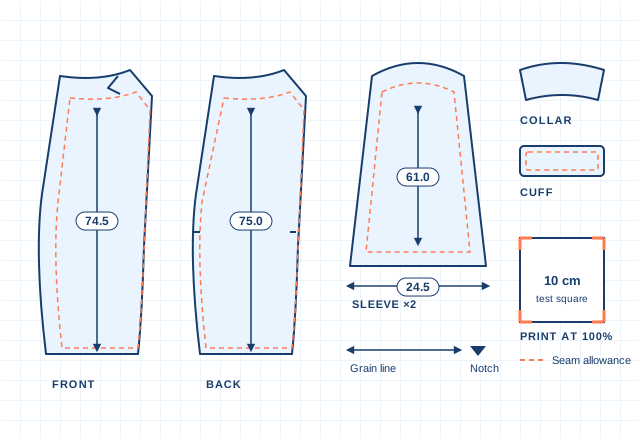
Sample sheet Sample tailor-pack sheet: shirt front, back, sleeve, collar and cuff pattern pieces with seam allowance, grain lines, notches, measurements and a 10 centimetre test square
  • Cover sheet with design preview
  • Body and garment measurement table
  • Pattern pieces at 1:1, tiled
  • Cutting layout for common fabric widths
  • Fabric and trim list
  • Stitching order and tailor notes
Try the idea

From a size label to tailor measurements

Pick the three sizes a user would enter. The pack engine turns them into the measurements a tailor works from. These are starter formulas for illustration; the shipped tables come from published Indian size surveys and the tailor pilot.

Shirt sizes 28 to 34 are usually boys’ and teen sizes. Pant size is the waist in inches.

Finished garment measurements (inches / cm)
GarmentMeasurementInchescm
Step 8 · live preview

See it on you before it is cut

Open your camera and your saved, size‑matched outfit appears on your body in real time, in the spirit of the Anywear Chrome extension, but for the designs you made.

1

Live 2D overlay

Pose tracking in the browser warps the garment onto your shoulders and torso. Fast, light, works on mid‑range phones.

Ships first
2

3D garment mesh

Better sleeves, collar and occlusion when you move your arms. More build effort, so it is an upgrade.

Full tier
3

Photoreal still (optional)

A paid try‑on API renders one realistic photo. It is not live, and the open‑source models carry non‑commercial licences, so a commercial API is used.

Add‑on

Your video is processed on your device and never uploaded. Only the outfit you save and your sizes are stored.

Requirements

Everything the app must do

Each of your nine steps becomes testable requirements, plus the quality bars that make it work on every phone, tablet and desktop.

Register and sign in

FR‑1 · Step 1
  • Phone number with one‑time code, plus email link or Google as a fallback
  • Age question at sign‑up; under‑18 users need a parent or guardian’s verifiable consent
  • Sessions, sign‑out everywhere, delete my account and data

Accept: a new user reaches the size screen in three screens or fewer.

Capture sizes

FR‑2 · Step 2
  • Shirt (chest 28 to 50), pant (waist 26 to 46) and T‑shirt (XS to 3XL)
  • Optional height, weight, chest, waist, hip and preferred fit; inches or cm
  • Inline help that shows what each number means

Accept: impossible combinations are flagged; every save is versioned.

Profile in the user’s name

FR‑3 · Step 3
  • View and edit sizes any time; see the history
  • After a size change, offer to re‑fit every saved design
  • Language: English or हिंदी

Accept: one action re‑fits all designs and tells the user what changed.

Upload a favourite outfit

FR‑4 · Step 4
  • Camera, gallery or screenshot; JPG, PNG, WebP or HEIC up to 10 MB, resized on the device
  • Safety screening of every upload; if several people appear, the user taps the one to copy
  • Raw uploads auto‑deleted after a set period

Accept: preview shown with a clear progress state; failures explain what to retake.

AI designs it for the user’s size

FR‑5 · Step 5
  • Reads garment type, collar, sleeve, fit, length, pockets, colours and prints into a validated JSON spec
  • Asks the user when confidence is low; logos and brand marks become plain or user‑chosen art
  • Simple edits: collar, sleeve length, hem, fit

Accept: 100% of exported specs pass schema validation.

Save and manage designs

FR‑6 · Step 6
  • Autosave, rename, duplicate, compare two versions, delete
  • Library works offline for viewing
  • Each design remembers the size version it was cut for

Accept: no design is lost on refresh or a dropped connection.

Export the tailor pack

FR‑7 · Step 7
  • PDF per garment: cover, measurements, pieces at 1:1 on A4 tiles (A0 option), cutting layout, fabric list, stitch steps
  • English and हिंदी notes; share by link or messaging app
  • Reproducible: the pack records the engine version it was made with

Accept: the 10 cm test square prints at 100 mm ±1 mm on a correctly set printer.

Live try‑on

FR‑8 · Step 8
  • Clear camera‑permission flow; front camera by default; video never uploaded
  • Overlay a saved design, swap designs, capture a photo to the device
  • Fallback: try on from a photo when no camera or permission is available

Accept: smooth on mid‑range Android and recent iPhones; verified with a network log.

Accuracy and feedback

FR‑9 · Step 9
  • Measurement overrides on top of size labels
  • After stitching, the user or tailor reports where it was tight or loose
  • Feedback tunes ease and tables; tailor pilot dashboard

Accept: pilot garments measured against the pack; results published internally.

Build plan

Nine phases from idea to launch

About 22 to 26 weeks for the recommended Standard scope with a team of five to seven. Phases overlap; the pilot with tailors is the gate that matters most.

  1. 0

    Discover and validate

    2 weeks

    Prove the real problem and settle what “size 32” means before any code.

    Tasks

    • Interview about 15 boys and young men and 5 tailors
    • Collect 100 sample outfit photos
    • Agree garment list and measurement spec

    Deliverables

    • Product brief and scope
    • Size‑label glossary
    • Sample tailor pack drawn by hand

    Exit when

    • A tailor says they could stitch from the sample pack
    • Scope and budget are signed off
    Project managerUI/UX designerPattern consultant
  2. 1

    Design system and UX

    3 weeks

    Responsive screens for phone and desktop, designed once.

    Tasks

    • Flows for the nine steps
    • Design tokens, components, states
    • English and हिंदी copy

    Deliverables

    • High‑fidelity prototype, mobile and desktop
    • Component library in code

    Exit when

    • 8 test users finish the flow without help
    • Accessibility checks pass on the prototype
    UI/UX designerFrontend
  3. 2

    Platform foundation

    4 weeks

    Sign up, sizes and profile working on a real staging site.

    Tasks

    • Repo, CI/CD, staging and production
    • OTP sign‑in; start DLT registration early
    • Profile, size history, consent and parental gate

    Deliverables

    • Working steps 1 to 3
    • Error tracking, logs, cost dashboard

    Exit when

    • A new user signs up and edits sizes on staging
    • Data deletion works end to end
    BackendFrontendDevOpsQA
  4. 3

    Upload and AI design

    5 weeks

    Turn a messy screenshot into a validated garment spec and a preview.

    Tasks

    • Upload, safety screening, crop assist
    • Vision prompt and JSON schema; low‑confidence questions
    • Preview render; simple edit controls

    Deliverables

    • Steps 4 to 6 end to end
    • Benchmark set of 100 outfits with expected specs

    Exit when

    • The target share of benchmark photos give a valid spec (set in Phase 0)
    • Average cost per design is inside budget
    ML / visionBackendFrontend
  5. 4

    Pattern engine and tailor pack

    6 weeks

    The accuracy core: sizes in, checked pieces and a 1:1 PDF out.

    Tasks

    • Size tables, ease and seam rules for shirt, pant, T‑shirt
    • Geometry tests: seam match, symmetry, closed paths
    • Tiled PDF, test square, EN/HI notes

    Deliverables

    • Step 7 working
    • Automated test suite for every pattern

    Exit when

    • All geometry tests pass
    • Printed test square is 100 mm ±1 mm on 3 printers
    BackendPattern consultantQA
  6. 5

    Live try‑on v1

    4 weeks

    Camera opens, outfit appears on the user, nothing leaves the device.

    Tasks

    • MediaPipe pose, garment warp and overlay
    • Permission and fallback flows
    • Tune on five real devices

    Deliverables

    • Step 8 working on phone and laptop

    Exit when

    • Smooth on the target devices
    • A network log shows no video upload
    WebGL / ARFrontendQA
  7. 6

    Tailor pilot and accuracy loop

    4 weeks

    Stitch real garments, measure them, fix the patterns.

    Tasks

    • About 10 volunteers × 3 garments, stitched by 3 partner tailors
    • Measure finished garments against the pack
    • Feedback form and tailor dashboard (FR‑9)

    Deliverables

    • Pilot report with measured error
    • Tuned ease and size tables

    Exit when

    • The accuracy target agreed in Phase 0 is met, or the claim is reworded to what was measured
    Pattern consultantBackendProject manager
  8. 7

    Harden, test and comply

    3 weeks

    Make it safe, fast and lawful on every device.

    Tasks

    • Device and browser matrix, load test
    • Security review; accessibility audit
    • DPDP review with counsel; terms and privacy notice

    Deliverables

    • Launch checklist, runbooks, backups

    Exit when

    • No open critical or high issues
    QADevOpsLegal advisor
  9. 8

    Launch and improve

    2 weeks, then ongoing

    Staged roll‑out, watch cost and fit, keep improving.

    Tasks

    • Invite‑only start, then open
    • Watch cost per design and error rates
    • Monthly pattern and model updates

    Deliverables

    • Live product; support playbook

    Exit when

    • Handover to the maintenance retainer
    Whole team
Cost in India

What it costs to build, in rupees

Three scopes, priced from role rates and person‑weeks. Each range runs from a freelance‑led team to a studio; a full agency quote is shown beside it.

Lean MVP

Prove the loop with real users.

₹24–41 lakhbuild, before 18% GST · agency quote ≈ ₹68 lakh

17–20 weeks5–6 people
  • Sign‑up with OTP, sizes, profile
  • Upload, AI design, save
  • Tailor pack for shirt, pant, T‑shirt
  • Live 2D try‑on v1
  • Tailor feedback loop and Hindi
  • 3D try‑on, store apps
Recommended

Standard

What we would launch with.

₹27–47 lakhbuild, before 18% GST · agency quote ≈ ₹77 lakh

22–26 weeks5–7 people
  • Everything in Lean MVP
  • Accuracy tooling and fit‑feedback loop
  • Tailor pilot dashboard
  • Hindi, analytics, performance hardening
  • 3D try‑on, store apps

Full

Scale‑up polish.

₹34–59 lakhbuild, before 18% GST · agency quote ≈ ₹98 lakh

28–34 weeks6–8 people
  • Everything in Standard
  • 3D garment try‑on upgrade
  • Android and iOS store wrappers

All build figures include a 15% contingency and exclude running costs, GST and your own time.

Build your own estimate

Tick the modules you want and choose who builds it. The total updates from the same rates and effort used above.

Modules

Role rates used (₹ per hour)

Hourly rate assumptions by role and hiring channel
RoleFreelanceStudioAgencyPerson‑weeks (Standard)

Rates are rounded from 2026 India rate cards, which quote about ₹700–1,400 per hour for mid‑level local engineers and $55–90 per hour for mid‑level agency work. A person‑week is 40 hours.

Running costs after launch (per month)

Estimated monthly running cost by active users
Active users1,00010,00050,000
Hosting, database, storage, SMS, email, monitoring₹5.7k₹14.7k₹49k
AI, lean path (≈ ₹4.4 per design)₹13k₹1.3 lakh₹6.6 lakh
AI, balanced path (≈ ₹8.8 per design)₹26k₹2.6 lakh₹13.2 lakh
Total, lean path₹19k₹1.5 lakh₹7.1 lakh
Total, balanced path₹32k₹2.8 lakh₹13.7 lakh

Assumes 3 designs per user per month and one 20% contingency on infrastructure. AI is over 90% of the bill, so free designs are capped and extra ones sold as credits. Live try‑on runs on the device and adds almost nothing.

One‑time and yearly items

  • SMS sender registration (DLT) about ₹5,900, plus domain: about ₹9–11 thousand in total
  • Google Play developer account $25 once (about ₹2,400); Apple developer account $99 a year (about ₹9,600), only if you want store apps
  • Maintenance after launch: plan 15–25% of the build cost per year
  • Legal review of the privacy notice and parental‑consent flow: budget separately with your counsel

How to read these numbers

  • They are planning estimates from public rate cards and price lists, dated 8 October 2026 at ₹96.83 per US dollar.
  • For comparison, Indian agency guides put a lean single‑platform MVP at ₹6–18 lakh, AI apps at ₹6–60 lakh, and AI plus AR fashion apps at ₹35–90 lakh.
  • The biggest swing factors are the tailor pilot, the number of garment types, and how photoreal the try‑on must be.

Not a quote. Prices vary by vendor, city and scope, and AI prices change often. Re‑check the model price pages before launch.

Sources: Second Talent India rate card · Project Cost Estimator · eCorpIT AI app cost · Riolabz app cost bands · PerfectionGeeks AI stylist cost · Gemini API pricing · FASHN API pricing · MSG91 OTP pricing · Supabase · Cloudflare R2.

FAQ

Questions people ask first

How accurate will the tailor pack really be?

The geometry is exact: every seam length is computed and checked, and every sheet prints with a 10 cm test square so you can confirm scale. The fit on your body depends on your real measurements, the fabric and the stitching. That is why the plan includes a tailor pilot and a fit‑feedback loop, and why accuracy numbers on this page are targets until they are measured.

Can a photo really become a pattern?

A photo shows style, not measurements. The AI reads the style (collar, sleeve, length, fit, pockets) into a structured spec. Your sizes supply the numbers, and a pattern engine draws the pieces. If the photo is unclear, the app asks you instead of guessing.

What does shirt size 32 mean?

Brands use different labels: chest in inches, collar, or boys’ sizes. The sign‑up screen explains each one next to the field and offers a quick way to measure. Pant size is the waist in inches. Adding height or a favourite shirt’s measurements makes the result closer.

Is my camera video uploaded?

No. Live try‑on is designed to run on your device. The plan includes a network‑log check in Phase 5 to prove it. Only the outfit you save and your sizes are stored.

I am under 18. Can I use it?

The product is meant for boys and young men, so it is designed around India’s data‑protection rules for children: a parent or guardian’s verifiable consent, no behavioural tracking and no targeted ads for under‑18 users. Counsel should review the final flow before launch.

Do I still need a tailor?

Yes. The pack is written so that any tailor can cut and stitch from it. It replaces the vague “make it like this photo” conversation with measurements, pieces and a stitching order.

Will it copy brand logos or prints?

It recreates the cut and colours of a garment, not logos or protected prints. Those areas become plain, or you can add your own artwork.

Which devices does it work on?

It is one web app that adapts from small phones to wide desktops, and installs to a phone’s home screen. Live try‑on needs a camera and a secure (HTTPS) page. If a camera is not available, you can try on from a photo instead.

How much does it cost to build and run?

The Standard scope is estimated at ₹27–47 lakh to build, with a monthly running cost of roughly ₹32 thousand at 1,000 active users, mostly AI. See the cost section to build your own estimate.

Accounts open at launch

FitCraft AI is at blueprint stage, so there is nothing to log in to yet. This page is the plan: what the app does, how to build it and what it costs.

See the build plan